

The following article will show you how to edit settings for your Button and adjust available settings.
Settings for your Panic Button can be modified from the button’s Settings tab, which can be accessed after clicking or tapping on the button from the Manage screen list view.
The options available within settings may vary depending upon Button firmware and hardware.
-
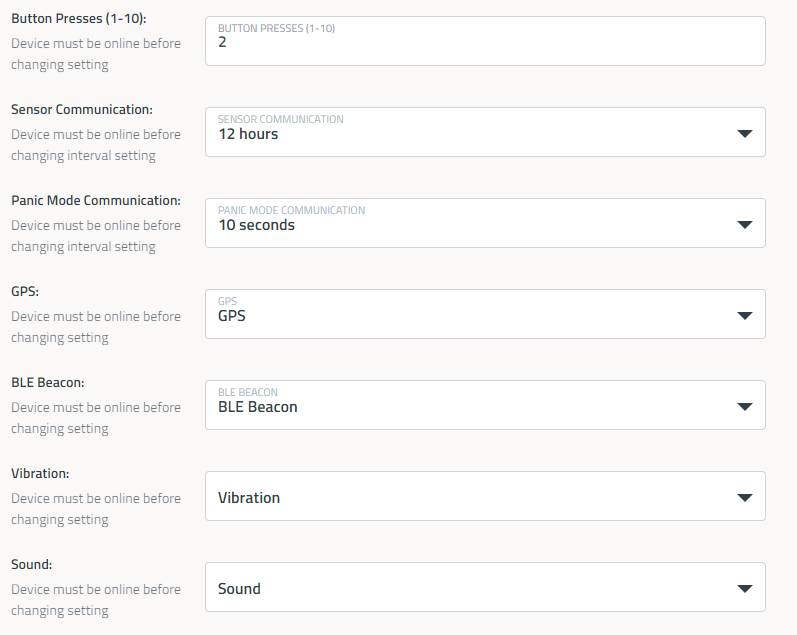
Button Presses (1-10) - The number of presses required before the button will enter the alert mode.
This defaults to 2 presses for most installations. -
Sensor Communication - How often the button will send a periodic keep-alive reading which includes current location when idle.
This defaults to 12 hours and should be a large value so as to not waste battery life reporting in too often while idle. -
Panic Mode Communication - Once the button enters alert mode, this controls how frequently it will send out a new alert reading including current location.
This defaults to 10 or 15 seconds and should typically be a very small value so you can track the button in real time. -
Vibration - Enables or disables vibration function on the button.
Default setting: ON -
Sound - Enables or disables sound function on the button.
Default setting: OFF -
GPS - Enables or disables use of the GPS positioning when the button cannot find a beacon in range.
Default setting: ON -
BLE Beacon - Enables or disables the use of connecting with bluetooth beacons for indoor positioning.
Default setting: ON This should remain on unless you are not using beacons in your panic button installation.
Example: Adjust Number of presses required to trigger panic mode
This feature requires your button to have the correct configuration (hardware version, firmware and template selected) for your device. If you do not see the Button Presses option, this indicates that your button is not currently configured to allow this setting to be changed.
When supported, you can use the Button Presses setting on the Device Settings screen to adjust the number of presses required before entering alert mode. We recommend using 2 or more presses as single-press buttons can be prone to false alarms if users bump them.
Be sure to remember to Save your change after making an adjustment on this screen.
Don't forgot that you can also use the Apply Settings to Other Devices setting on this screen in case you need to apply this change to multiple buttons at once.
After saving your changes, a downlink command will be sent to the button when it next checks in with a new data point. You may also force an update by connecting your button to a charger. If it’s already plugged in, disconnect and reconnect from the charger. The button will vibrate to confirm changes